


All My Meals - Keep Recipes
4.89.00 Reviews
App Specs
- Version
- 1.29.6
- Updated On
- License
- Free
- Downloads
- 100,000+
- Developer
- NatiMate GmbH
- Categories
- Food & Drink
- Platform
- Android
Screenshots


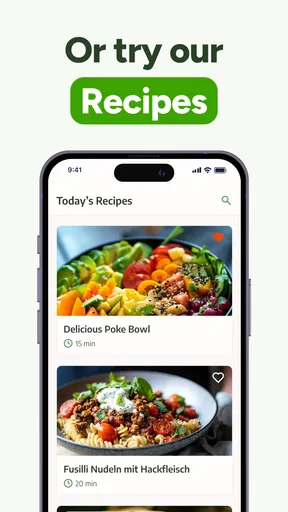
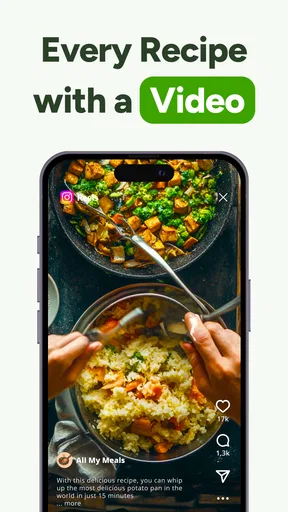
 Analysis by AppCompare
Ever found yourself rummaging through a clutter of recipe cards, bookmarked web pages, and screenshots just to figure out what’s for dinner? Well, let me introduce you to All My Meals - Keep Recipes. This app has been a game-changer for keeping my culinary chaos in check.
What’s Cooking with All My Meals?
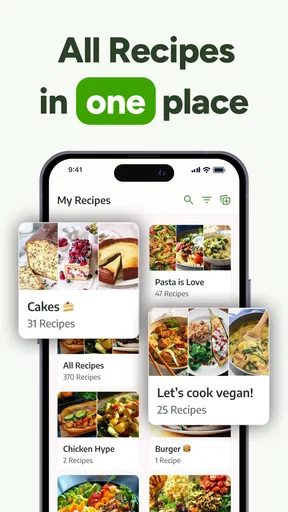
The first thing that caught my attention was the app's intuitive interface. From the moment you open All My Meals - Keep Recipes, it feels like you're entering a digital kitchen that's perfectly organized. The home screen is straightforward, showcasing your saved recipes, meal plans, and a nifty feature to create shopping lists. The app makes it super easy to store recipes from various sources, whether it's a website link, a photo, or even a manual entry.
Recipe Organization at Its Finest
One of the standout features is how effortlessly you can categorize and tag your recipes. Got a killer lasagna recipe that you found online? Simply save it, tag it under "Italian" and "Comfort Food," and voilà, it’s at your fingertips whenever you crave some cheesy goodness. Plus, the search function is pretty robust. You can filter your recipes by ingredients, prep time, or even dietary preferences.
Meal Planning Made Easy
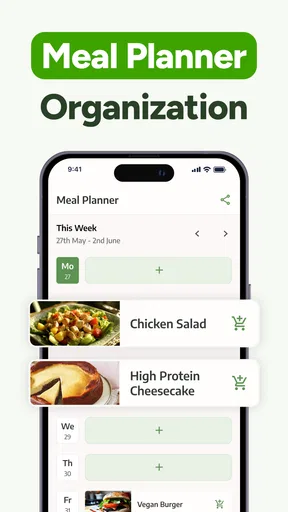
If you're anything like me, meal planning can feel like a chore. But with All My Meals, it’s as simple as drag and drop. You can plan out your meals for the week and adjust them on the fly. It’s like having a personal meal planner in your pocket. Plus, the app syncs seamlessly across devices, so your meal plan is always updated whether you're on your phone or tablet.
Grocery Shopping Simplified
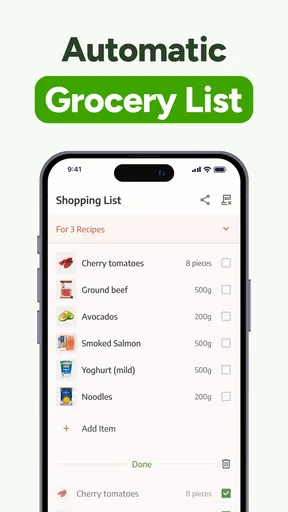
The shopping list feature is another highlight. Once you've planned your meals, the app automatically generates a shopping list, grouping items by category. This means no more backtracking in the supermarket because you forgot the basil in the produce section. It’s a subtle touch, but it makes the whole experience much smoother.
My Personal Take
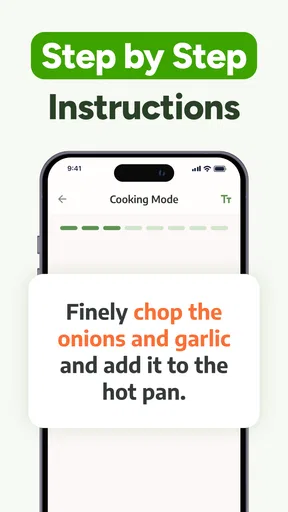
I’ve tried a few recipe apps before, but All My Meals - Keep Recipes stands out for its user-friendly approach and comprehensive features. The ability to store recipes from virtually any source is a huge plus. The app also supports importing recipes from popular food websites, which saves a ton of time. Plus, you can adjust serving sizes, and the app recalculates ingredient quantities automatically. Genius, right?
But, let’s keep it real—no app is perfect. Occasionally, I’ve noticed a small lag when importing big recipes with lots of images. However, it’s a minor hiccup in an otherwise seamless experience.
Worth Reading Before You Choose

EA SPORTS FC Mobile 26 Is a Bigger Football Game, but It Takes Time

Flipboard Shows What News Apps Must Do Beyond the Feed

Switching to Android Auto Means Rethinking Your Driving Routine

Google Calendar Makes a Crowded Week Easier to Manage

Ludo King Makes the Most of the Minutes Between Plans

Baby Panda World Brings Quick Play to Modern Phones, but Its Game Library Feels Busy
Conclusion: A Must-Have for Food Lovers
In a world where convenience is king, All My Meals - Keep Recipes delivers a royal experience for anyone who loves cooking or simply wants to eat better without the hassle. It’s a one-stop-shop for recipe management, meal planning, and shopping lists. If you find yourself drowning in a sea of disorganized recipes, give this app a whirl. It might just be the culinary assistant you didn’t know you needed.
Hungry for more? Check it out on the app store and start your cooking adventure today!
Pros
- User-friendly interface for easy navigation.
- Option to categorize recipes for quick access.
- Syncs across devices for convenience.
- Allows sharing recipes with friends easily.
- Offline access to saved recipes.
Cons
- Limited free features without subscription.
- No integration with grocery delivery services.
- Occasional app crashes reported by users.
- Requires account setup for full features.
- Ads can be intrusive in free version.
FAQs for All My Meals - Keep Recipes
What platforms is All My Meals - Keep Recipes available on?
All My Meals - Keep Recipes is available for both Android and iOS platforms. You can download it from Google Play Store for Android devices and the Apple App Store for iOS devices. Ensure your device meets the minimum operating system requirements for a seamless experience.
Does All My Meals offer any offline functionality?
Yes, All My Meals allows you to access your saved recipes offline. This feature is particularly useful when you're cooking in areas with limited internet connectivity. However, initial recipe saving and updates require an internet connection to sync data across your devices.
Can I customize and edit the recipes within the app?
Absolutely! All My Meals provides users the ability to customize and edit recipes to fit personal preferences or dietary requirements. You can modify ingredients, cooking instructions, and even add personal notes to each recipe, allowing for a truly personalized cooking experience.
Is there a subscription fee or any in-app purchases?
All My Meals offers a free version with essential features. However, to unlock premium features such as advanced meal planning tools, ad-free browsing, and exclusive recipes, a subscription is available. The app provides clear information on what each plan includes before you decide to purchase.
How does All My Meals handle user data and privacy?
All My Meals takes user privacy seriously by adhering to strict data protection policies. The app requests only essential permissions and ensures that all personal data is stored securely. Users can review and manage their data settings within the app, ensuring transparency and control over their information.


